Download Carrots for Windows
A file browser built for creators. Free during the beta, with no account and no credit card.
Windows 10 (1809+) and 11·x64·Code signed by Carrots LLC
Just installed? Read the User Guide (PDF) →
First 3 things to try.
-
 1
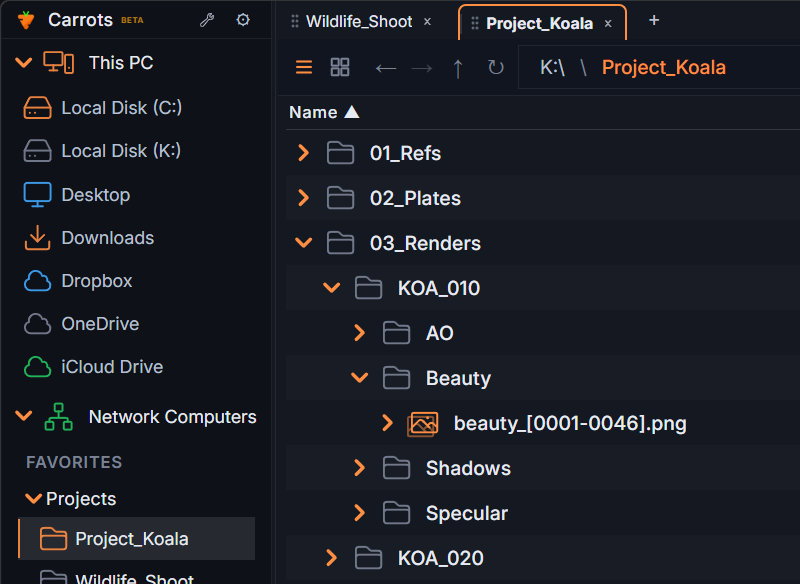
Expand a folder in place.
Click the arrow next to any folder. It opens right in the list, so you keep your place.
-
 2
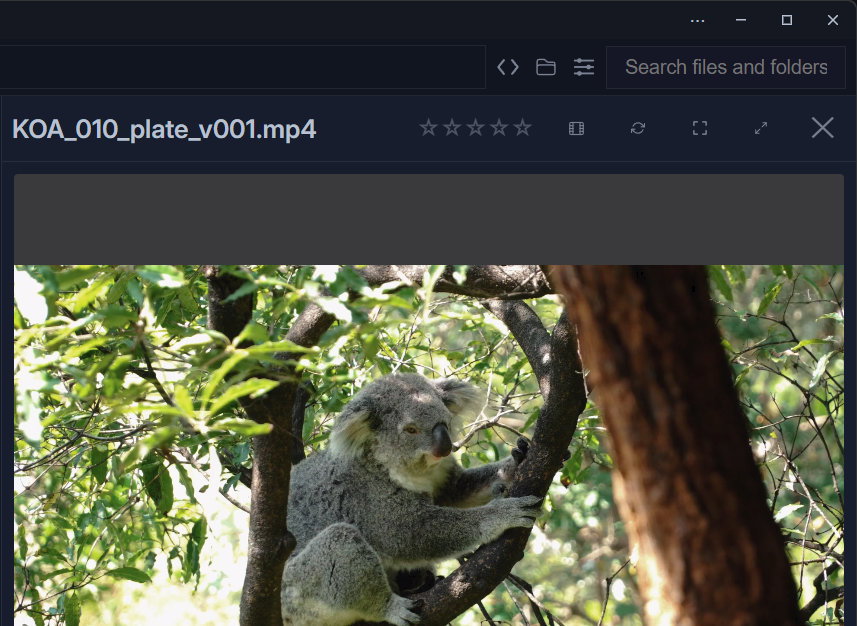
Press Space to preview.
Select a file and press Space. Quick Preview opens images, video, 3D models, PDFs and more.
-
 3
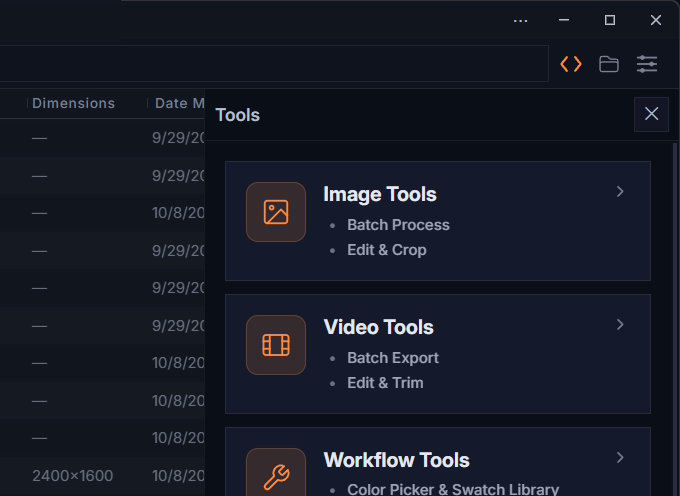
Open the Tools panel.
Batch rename, convert, crop, resize and trim, right where your files are.


Found a bug or have an idea? Use the Feedback form, or email support@carrots-app.com.
System requirements
Privacy & safety
- The app collects no data: no account, no telemetry, fully local.
- Works offline: file operations happen on your PC.
- No account: download, install and open a folder.
- Code signed: verified publisher Carrots LLC.
- Safe deletes: files go to the Recycle Bin, and you're warned before anything is permanently deleted.
- 230+ automated safety tests on every release.
This website uses basic visitor analytics. See the Privacy Policy.
Hear about new builds and the launch.
Occasional emails about new beta builds and the paid release. No spam.
About the beta
Beta builds update regularly; install the latest to keep going. The paid release has a 30-day trial, and early adopters lock in $39/yr.
What's new in 1.24.5
Latest- Image sequence playback (quick in-app conversion) and convert to video
- Compress for Sharing up front, with correct file types and clear failure messages
- Copy indicator, frame number display and drag-to-reorder metadata columns
- Refreshed icon set, and dragging files onto another tab
- Safer selections: filters, search and collapsed folders no longer leave hidden files selected
- Fixes for Open With, Favorites and Light Mode
Carrots for Windows
A file browser built for creators. Free during the beta, with no account and no credit card.
Carrots is a Windows app.
Open this page on your Windows 10 or 11 PC to download it (48 MB).
carrots-app.com/betadownloadOr find it on the Microsoft Store.
Hear about new builds and the launch.
Occasional emails about new beta builds and the paid release. No spam.
First 3 things to try.
- 1
Expand a folder in place.
Click the arrow next to any folder. It opens right in the list, so you keep your place.
- 2
Press Space to preview.
Select a file and press Space. Quick Preview opens images, video, 3D models, PDFs and more.
- 3
Open the Tools panel.
Batch rename, convert, crop, resize and trim, right where your files are.
Found a bug or have an idea? Use the Feedback form, or email support@carrots-app.com. The User Guide (PDF) walks through everything.
Privacy & safety
- The app collects no data: no account, no telemetry, fully local.
- Works offline: file operations happen on your PC.
- Code signed: verified publisher Carrots LLC.
- Safe deletes: files go to the Recycle Bin, and you're warned before anything is permanently deleted.
- 230+ automated safety tests on every release.
This website uses basic visitor analytics. See the Privacy Policy.
System requirements
About the beta
Beta builds update regularly; install the latest to keep going. The paid release has a 30-day trial, and early adopters lock in $39/yr.
What's new in 1.24.5
- Image sequence playback (quick in-app conversion) and convert to video
- Compress for Sharing up front, with correct file types and clear failure messages
- Copy indicator, frame number display and drag-to-reorder metadata columns
- Refreshed icon set, and dragging files onto another tab
- Safer selections: filters, search and collapsed folders no longer leave hidden files selected
- Fixes for Open With, Favorites and Light Mode
©2026 Carrots, All rights reserved.